Hostgator GDPR Compliance

I couldn’t find anything on the hostgator website about GDPR, so emailed privacy(at)hostgator.com

Update: Hostgator have since added some gdpr compliance information:
https://support.hostgator.com/articles/pre-sales-policies/general-data-protection-regulation

Here is the email we sent to hostgator:

“We currently use Hostgator to host our websites.
Please can you let me know your status with becoming compliant with the new EU data privacy law (GDPR) which comes into effect on 25th May? https://gdpr-info.eu/
The law states that all our data processors (suppliers) must adhere to the law even if they are not based in the EU.”

Got a response and figured this might be useful for some people (UK & EU customers of hostgator) to know…

[27/04/2018] Currently, HostGator is not compliant with the General Data Protection Regulation. However, we are committed to achieving compliance with the GDPR by May 25, 2018. This will include work that will be “behind the scenes” such as the reviewing and revision of our agreements, internal processes, features, templates, and policies as necessary to assure our compliance.

With becoming GDPR complaint, both HostGator and our clients have obligations. Our Terms of Service requires that clients lawfully obtain and process all personal data appropriately which is something that must continue with becoming GDPR compliant. If you collect EU residents’ personal data, you are likely to be classified as a data controller under the General Data Protection Regulation. To clarify, this means you will have some additional obligations around such things as data subject rights.

We urge you to understand this and seek legal advice where you think necessary. HostGator is reviewing providing our customers with additional features, such as updated consent tools and the ability to respond to a customer data subject request. Moving forward, this email has now established a direct line of communication with our Management Team and will remain assigned to our Department. Please do not hesitate to let us know if you have any additional questions or concerns that we have yet to address.

This is a well written and reassuring response :)
I hope this info is useful to you.

URL Redirect Check Tool – 301 Redirect Checker

I have made simple Redirect Check Tool.This tool can quickly and easily tell you if an URL redirects to another, the URL where it redirects to and the response headers returned by the server.

This is useful for SEO purposes and also if you have asked your web hosting company to make 301 redirect changes on your behlaf and you wish to check everything redirects OK

Enter an URL in the form below and you’ll be taken to the results page where you will see the URL header response code (type of redirect) and where the URL redirects to.

Enter URL to check

See more of my handy tools here: Tools

How to Disable Javascript in your Browser

You can easily disable javascript in any browser completely or you can disable javascript for a specific site/domain in the Chrome Browser.

Note: Make sure you remember to re-enable javascript when you’re done!

Internet Explorer:
1. Click the little gear (top right)
2. Click “Internet Options”
3. Choose the “Security” Tab
4. Click “Custome Level…” Button (near the bottom)
5. Scroll down to the “Scripting Section”
6. Locate the Active scripting subheading and select the “Disable” radio button.
If you would rather be prompted each time a website attempts to launch any javascript code, select the “Prompt” radio button instead.

Chrome:
1. Click the spanner icon (“Customise and Control Google Chrome”)
2. Click “Options”
3. Click “Under the Bonnet”
4. Click the “Content Settings…” button at the top (next to where it says “Privacy”)
5. In the “Javascript” section make sure that “Allow all sites to run JavaScript (recommended)” is selected
6. then click the “Manage Exceptions…” button
7. Select “Block” from the drop down box
8. Enter the hostname in the text box: http://en.wikipedia.org
9. Hit Enter

(to remove this javascript block for after the “blackout” just goto the same “Manage exceptions” page hover your mouse over the wikipedia entry you added and click “X”)

Firefox:
1. On your keyboard hold down “Alt+T” together then tap “O”
2. Click the “Content” icon
3. Untick “Enable Javascript”
This will disable javascript on ALL sites you visit until you tick “Enable Javascript” box again

Safari:
1. Open Safari
2. On your keyboard hold down the “Ctrl” key and tap the comma [,] key
3. Select the “Security” icon
4. untick “Enable JavaScript”

Google Chrome – Disable Recently Visited Sites in New Tab

Sometimes you don’t want (or don’t want anyone else) to see a list of the last few pages you have visited in chrome.

To default to a different view whenever you
At the bottom of a new tab there are two options “Most Visited” and “Apps”. If you click “Apps” Chrome will now default to the Apps page instead of the Recently / Most visited page whenever you open a new tab.

At the time of writing there is no way to actually disable this recently visited sites page / thumbnails but you can install a 3rd party plugin such as Incredible Start Page which allows you to customise the new tab page really well.

connection to the server was reset in Hotmail, Firefox

Been having trouble logging into hotmail the last few days, after entering username and password, just get an error saying:

“The connection to the server was reset while the page was loading”

To clear this and actually log on to your hotmail just do the following:

if you have the “Web Developer Toolbar” plugin:
Click Miscellaneous > Clear Private Data > HTTP Authentication

If you don’t have the plugin:

  1. When in Firefox hold down:
    Ctrl + Shift + Del together
  2. Tick “Active Logins
  3. Click “Clear Now” button

Try and log into hotmail again and it will let you in, at last!

Google’s New Sitelinks

Sitelinks have been around for a while but used to look like this:
Old Style Sitelinks

Now they look like this!:
New Google Sitelinks for Microsoft
Within Google’s new search hierarchy, sitelinks will now be full-size links with a URL and a line of snippet text, similar to regular search results. But Google has also designated a maximum number of 12 sitelinks per search result, giving pride of place within the page to the first search result.

The changes will roll out globally to all modern browsers, including Chrome, Firefox, and Internet Explorer 7 and above, Google said.

Sitelinks are useful to users as they may not be able to specifically identify where in a site they want to visit, so he or she merely types in the overarching domain.

“It turns out that sitelinks are quite useful because they can help predict which sections of the site you want to visit,” Daniel Rocha, a software engineer on the Google Sitelinks team, wrote in a blog post. “Even if you didn’t specify your task in the query, sitelinks help you quickly navigate to the most relevant part of the site, which is particularly handy for large and complex websites. Sitelinks can also give you a good overview of a website’s content, and let webmasters expose areas of the site that visitors may not know about.”

Google has also said that it is tweaking its search algorithm to accommodate the changes. “In addition, we’re making a significant improvement to our algorithms by combining sitelink ranking with regular result ranking to yield a higher-quality list of links,” Rocha said. “This reduces link duplication and creates a better organized search results page. Now, all results from the top-ranked site will be nested within the first result as sitelinks, and all results from other sites will appear below them.”

Don’t want to sign into messenger when using hotmail?

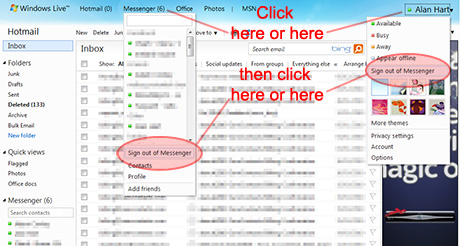
I discovered that when using hotmail on my new Windows 7 laptop it automatically signs me into msn / live messenger. After trying to find a setting somewhere to disable this feature i have finally found it (and it’s really very easy)…

I discovered that all you need to do to stop messenger logging in every time you check your email, just log into hotmail as usual, click your name in the top right, or open the messenger list and click “Sign out of messenger”.

How to stop MSN / Live Messenger loading in Hotmail

This will permanently sign you out of messenger in hotmail, and only hotmail.
If you are logged in on the normal desktop app you will stay logged in.

If you sign out / close your browser and sign back in to hotmail, messenger won’t load leaving you free to check your emails in peace!