£99 Fuel Charge - Petrol Forecourt

£99 Pound Fuel Charge? – Find Out Why

I have seen lots of posts online where people report being charged a £99 fuel charge for petrol or diesel at the petrol station despite only filling up with £10 / £20 / £30 etc!

Allow me to provide some answers and insight into how to prevent this £99 fuel charge from happening…

Why have I been charged more than the fuel i pumped?

Firstly don’t panic! This is only a temporary “holding” transaction called a “pre-authorisation charge”.
This is to make sure that the account you’re using actually has enough money in it BEFORE you start pumping. (The pump has the maximum amount you can fill up per transaction set to £99).

How do i get the money back?

The answer is simple… The extra money hasn’t actually gone anywhere. It simply gets held until the final transaction amount gets charged to your account. (for the actual amount of fuel you pumped).

How can I stop this £99 fuel charge from happening?

Is the fuel charge on your Debit Card?

Firstly, this £99 holding pre-authorisation charge is usually only charged on Debit cards (where the money is taken directly out of your current account using the funds available in the account).
Understandably this can cause a bit of worry, especially if you don’t have much money left in your account and need the money to pay for food or other important things.

The good news is that you can actually prevent fuel transactions from having any impact at all on your current account balance.

The Answer?

The answer is actually very simple… Use a credit card.
How does this work? Well, I have noticed that credit card transactions in petrol stations are actually usually treated differently to debit cards.
With my credit card I can see the actual fuel amount is pre-authorised, not the maximum £99 fuel charge. This appears as a “Pending” transaction (for the fuel amount) and is quickly followed by the actual fuel charge. The pending charge will then disappear (usually withing 24 hours of the actual charge)

So in a nutshell… The easiest way to protect your current account from the £99 fuel charge (as well as better protection from fraud) is to have a credit card just for fuel. (or even better, for all in store and online spending).

But Be Careful…

With a credit card there is no direct access to your cash, in your bank account, so it’s much safer.
But be sensible and make sure that you spend only as much as you can afford and ALWAYS pay off the credit card bill in FULL every month. (this should be super easy if you only use it for fuel)

I hope this helps, I understand that not everyone will be able to get a credit card. But I have always seen it as a safer option than giving direct access to the content of your bank account!

If me writing this post has helped to put your mind at ease, please consider
buying me a coffee (you choose the donation amount) by tapping/clicking the image link below…

A few links:
ASDA Pay at pump charge: https://www.asda.com/payatpump
Pre-authorisation pending: https://forums.moneysavingexpert.com/discussion/6454257/asda-pay-at-pump

Google Meet Emoji Shortcuts

I was hoping to find an option for emojis in google meet for GSuite as when running larger meetings in Google Meet, it can be difficult to gauge real-time feedback as you are speaking.

A while ago I posted about all the emoji keyboard shortcuts for google hangouts chat. Unfortunately it turns out that Google Meet does not currently support emojis in text chat*

However… i have found a handy chrome extension which allows team members to send real-time emoji reactions, such as thumbs up, to presenters and speakers during meetings on Google Meet. (Similar to reactions in Zoom)

It’s called “Nod – Reactions for Google Meet“

You can find it here: https://chrome.google.com/webstore/detail/nod-reactions-for-google/oikgofeboedgfkaacpfepbfmgdalabej or search the chrome webstore for it.

Hopefully this helps anyone also using GSuite and trying to get the most out of Google Meet.

If this helps you out please feel free to say thanks by clicking “Buy Me a Coffee” PayPal button in the sidebar (here) or via:https://www.paypal.me/AlanHart

Thank You

*at time of writing (24/04/2020)

I’m in a book!

This book in fact…

Fuck Yeah Video Games by Daniel Hardcastle

OK, well technically I had very little to do with the book in question.
I just backed it waaaay back in time (June 2018 to be precise) along with 9364 other geeks, gamers and fans of NerdCubed on Unbound (a crowdsourcing platform for books)

I’ve yet to read it, as it just arrived this morning, but as a supporter of the book i got to have my name or whatever else I wanted immortalised in the book forever! So naturally ,being the geek that I am, I chose this blog/website.


It’s a real, 100% bonefide book… available from waterstones which is kinda cool.

If you came here from seeing my website in the book please comment below, It will be interesting (for me, at least) to see how many people were bored/dumb enough to come here.

B4508 Road Closure near Watchfield- 6th Nov 2017

[19/12/2017] UPDATE:
The road has now re-opened. So the road is back to how it should be with no traffic calming and lovely new two lane bridge!


The B4508 Highworth Road, Watchfield, Oxfordshire, my usual route to and from work is closed.
Google yielded no answers so here’s why and when it’s closed…

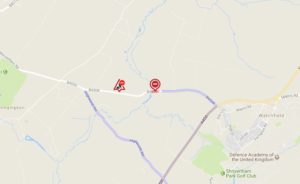
Map of roadworks on B4508 at Westmill bridge / watchfield
B4508 Highworth Road, Watchfield, Oxfordshire roadworks at Westmill Bridge from 6th November 2017

Highway Authority: Oxfordshire County Council
Location: B4508 Watchfield. From east side of Westmill Bridge westwards to end of road.
Description of works:
GFRP (Glass Fiber Reinforced Plastic) bridge deck repair.
Resurfacing.
Removal of traffic islands. (Yay! about time to)
Closure:
From 6th Nov to 15th Dec
24 hours a day 7 days a week.

Works ref: KE400999998777

Current status: Work in progress

Work info last updated: 00:00 on 06/11/2017

Latest up-to-date info on interactive map: https://roadworks.org/

Data source: Oxfordshire County Council

Why ALL4 Advertising Sucks – Worst implementation of online advertising ever?

All4 (Channel 4’s online catch-up tv service) sucks and here’s why….

We all know and understand that content providers especially commercial channels make their money from advertising.

Advertising isn’t that much of a deal, we’re all used to it, but when that advertising gets in the way of service users actually accessing the content they want to see, that’s when it becomes an annoyance, and in this case it’s a massive annoyance!

Here is an example of an experience with All4…

To view a catch-up video I have to sit through 6 minutes of ads at the start. (6 minutes! and unskippable! – How anyone can think this is acceptable is crazy)
As i already watched the first 45 minutes of the show a few days previously on live TV I click to skip to the last 15 mins of the hour long show to catch up on the bit that i missed.
I then get hit with 3m45s of more advertising!  (total time wasted = 9m45s)
I then go to pause the video and accidentally hit the skip back button… and get hit with another 3m45s of ads (total time wasted = 13m30s).
I then skip forwards to get back to the spot where i was watching and get 3m45s of EVEN MORE ADS!!

So after watching the last 15 minutes I wanted to catch up on i’ve been subjected to a total of 17m15s minutes of bloody adverts, making my entire viewing experience take more than double the time it should!

This is the most shockingly poor implementation of online advertising i have ever experienced.
On top of all this the video quality is rather poor.

Dear Channel 4 / All4, If you see this PLEASE end this insanity and change your service to make user friendly. At least allow users to skip ads if they’ve already watched at least 3mins of advertising.

I’ve sent Channel 4 a message so will be interesting to see what their reply is.

Update: Here’s a handy tip to save you sitting through 10+mins of ads… http://benjaminpeters.co.uk/removingskipping-adverts-on-all-4-4od/

McDonalds Scraps 5p Charge for Sauce/Dips?

Just picked up a deliciously juicy breakfast from a local McDonalds and it was 5p cheaper than usual…
The guy at the drive thru said that they are no longer charging the silly 5p surcharge for sauces and dips.

Free sauce for everyone?
Unfortunately this isn’t the same in McDonalds restaurants nationwide..

Comment below or tweet me (@alanhart) if your mcdonalds charges or not.

Virgin Media Tivo Update – My Shows list has changed – how to change it back

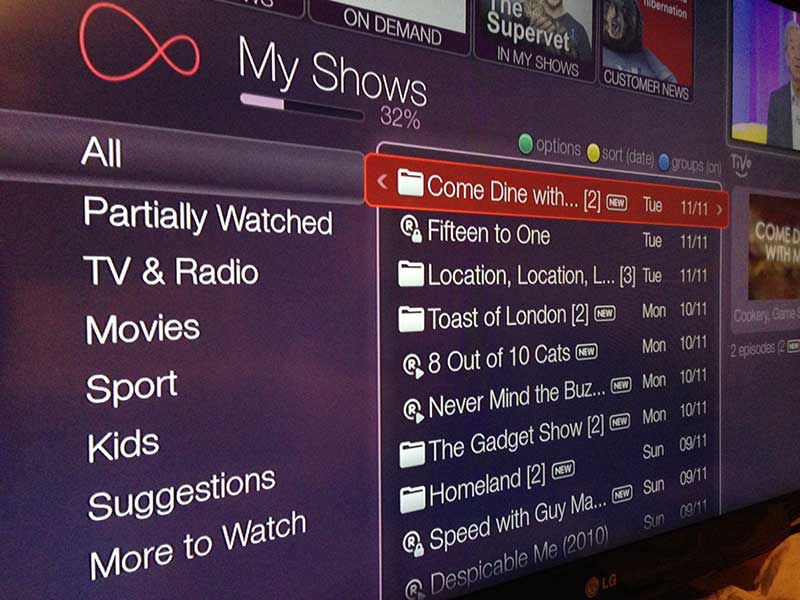
You may have noticed your Tivo box software has upgraded and the onscreen menu style has changed (it’s now a more subtle purple instead of bright red).

Along with this change is a feature adding a column to the left of your recorded items list.

The new “categories” view

If you don’t want this you can hide the left column making it look like it used to.

With categories hidden

Here’s how..

  1. Press the Green button
  2. Move down to the menu option “Left column [Show Categories]” and press the OK button
  3. Move down and select “Hide left column”
  4. Press OK or the Green button to confirm changes.

Easy as pie!

Sender’s email says it’s from/via my email address! – Google Apps / Gmail

I have many “Google Apps” accounts on domains.

Lets say one of these domains is “mydomain.com” for example…

There are regular gmail users under the same “Google Apps” account

For a long time I have used the “Google Groups” feature to have a group email address.

What’s  Google Apps Group?
If you don’t know (and let’s face it you probably do if you’re hear reading this) this is a feature which allows people to receive an email sent to a “Group” email address in their own inboxes.

e.g. Any email sent to the Google Apps Group email “appsgroup@mydomain.com” would go to the inboxes of three google accounts: alan@mydomain.com, ben@mydomain.com and carl@mydomain.com

In this scenario a “Google Group” is essentially just an alias address.

Recently (within the last few months) I have noticed that a few emails that have been sent to the appsgroup@mydomain.com group email address successfully arrive in the group members’ inboxes but with a From: header that looks like this:

From: ‘Someones name’ via AppsGroup [mailto:AppsGroup@YourDomain.com]
Reply-to: Real Sender <RealSender@AnotherDomain.com>

In other words, Google Apps/Gmail is making the email look like it’s coming from the appsgroup@mydomain email (i.e. myself!)

In certain versions of outlook you cant actually visually see the senders real email address and on iPhone this may cause the actual name of the sender to show up with your own name, since iPhone Mail pulls the name from it’s address book rather than from the email headers.

Originally I thought that the senders real email address was lost forever but it is actually in the headers.
You should be able to just hit reply and it will reply to the persons email

The problem arose for me because someone forwarded the email to me, thus stripping the original headers and therefore unable to see the original sender’s email address.

Why does this happen?
It turns out that Yahoo and AOL made changes to require mail providers that support the DMARC standard to reject all email from @yahoo.com accounts unless the mail actually originated at AOL and Yahoo’s servers. (Other providers have followed suit.)

If you have a Google Group / Alias address forwarding to a gmail account, it will rewrite the From: header as explained above if the provider sending the email has a strict DMARC policy like AOL and Yahoo. If they didn’t, the email may be rejected, depending on where it’s being delivered. (See the DMARC FAQ, where it looks like Google chose  option number 3).

It seems that the only way to fix this (i.e. prevent Google rewriting the header), is to remove your Google Group alias address, and replace it with an actual Google Apps user account you create with the same email address that you had for your Google Group alias. Then login to that new user account and set it up to forward mail  to your email address.

Of course this does mean if you pay for Google Apps users that you will need to pay for another user!

I had to explain this all the the friend in question and get them to reveal the original sender’s email address.

To see the email headers in Outlook:

Right-click on the email in question, and choose “Message options”
Scroll through the “Internet heaers” text box at the bottom and you will see the original sent from address:

Reply-To: Persons Name <person@email.com> or
X-Original-Sender: person@email.com
or
X-Original-From: Persons Name <person@email.com>