Google Hangouts Emoji Keyboard Shortcuts

Follow this link if you’re looking for the Windows Emoji Keyboard Shortcut.

I’ve been annoyed that i couldn’t find emoji keyboard shortcuts on Google Hangouts (on mobile or gmail in web browser), i was specifically looking for the thinking face emoji.

You can copy and paste from this list but keyboard shortcuts are so much easier

Naturally i did the geeky thing and tried to find it.

Here’s the geeky stuff…
The code for keyboard shortcuts is buried in a javascript variable “J7a”
To see the javascript yourself: make sure you have a hangouts chat open in gmail then…
right-click  > inspect > sources

Here’s a snippet of the javascript…
(more geeky stuff)
J7a={“!:)”:128579,”!:-)”:128579,”(=^..^=)”:128568,”(=^.^=)”:128568,”(N)”:128078,”(Y)”:128077, …
[REMOVED A CHUNK – THERE ARE A LOT OF THEM!]
…u_u:128532,x_x:128565,”}:)”:128520,”}:-)”:128520,”}=)”:128520,”~@~”:128169}

What you’re seeing there is each keyboard shortcut “:)” and the corresponding Unicode character in decimal.
e.g. 128053 is decimal for the hexidecimal value 0x1F435 (monkey face U+1F435) .

Here are the emoji shortcuts…
Without further delay, here’s the full list of all currently available Google Hangouts emoji keyboard shortcuts…

:Cfrowning/sad face 
(U+2639)
:) or :-)smiley 
(U+263A)
<3heart 
(U+2764)
-<@%honeybee 
(U+1F41D)
:(|)monkey face 
(U+1F435)
:(:)pig face 
(U+1F437)
(Y) or (y)thumb up 
(U+1F44D)
(N) or (n)thumb down 
(U+1F44E)
(]:{man with turban 
(U+1F473)
</3 or <\\3broken heart 
(U+1F494)
~@~pile of poo 
(U+1F4A9)
:D or :-Dgrinning face 
(U+1F600)
^_^grinning face with closed eyes 
(U+1F601)
:”Dlaughing face with tears 
(U+1F602)
=Dlaughing face open mouth with happy eyes 
(U+1F604)
^_^;;laughing face open mouth with tear 
(U+1F605)
O:) or O=) O:-)angel face (smiley with halo) 
(U+1F607)
}:) or }=) or }:-)devil face 
(U+1F608)
;) or ;-)winking face 
(U+1F609)
=)blushing smile 
(U+1F60A)
B-)smiley with sunglasses 
(U+1F60E)
:, or :-,smirking face 
(U+1F60F)
:| or =| or :-|neutral face 
(U+1F610)
-_-expressionless face 
(U+1F611)
o_o;downcast with sweat 
(U+1F613)
u_upensive face 
(U+1F614)
:/ or :\\ or =/
or =\\ or :-/ or :-\\
confused face 
(U+1F615)
:s or :S
or :-s or :-S
confounded face 
(U+1F616)
:* or :-*kissing face 
(U+1F617)
;* or ;-*face blowing a kiss 
(U+1F618)
=*blushing kissing face 
(U+1F61A)
:p or :P
or :-p or :-P
or =p or =P
face with tongue 
(U+1F61B)
;p or ;P
or ;-p or ;-P
winking face with tongue 
(U+1F61C)
:( or :-( or =(dissappointed face 
(U+1F61E)
>:( or >=( or >:-(pouting / angry face 
(U+1F621)
:'( or ='(
or T_T or ;_;
crying face 
(U+1F622)
>.< or >_<persevering face 
(U+1F623)
D:frowning with open mouth / worried 
(U+1F626)
:”(loudly crying face 
(U+1F62D)
:o or :O
or =o or =O or :-o or :-O
or o.o
face with open mouth / shocked 
(U+1F62E)
O.Oastonished face / gasping with shock 
(U+1F632)
X( or X-( or
X-o or X-O
or x_x
dizzy face 
(U+1F635)
:3 or :X)
or =^_^=
or (=^..^=)
or (=^.^=)
grinning cat with smiling eyes 
(U+1F638)
!:) or !:-)upside-down face 
(U+1F643)
>:(Xperson gesturing no / crossed arms 
(U+1F645)
\o or o/person raising hand 
(U+1F64B)
:)X or :-)X
or >:D<
hugging face / open hands 
(U+1F917)
\m/hand horn sign / ‘rock-on’ 
(U+1F918)
V.v.Vcrab 
(U+1F980)

Annoyingly, as you can see in the list, my original search for a keyboard shortcut for the thinking face emoji proved fruitless…
There isn’t one  … yet

For reference here’s the current Unicode full emoji list.

I hope this helps you and saves you from diving into the javascript source!

If this helps you out please feel free to say thanks by clicking “Buy Me a Coffee” PayPal button in the sidebar (here) or via:https://www.paypal.me/AlanHart

Thank You

YouTube – Associated website “pending”

After jumping through all the hoops to try and get a website verified on a company YouTube channel (in order to link to the company website via annotations) the associated website was still showing as “Pending”

(here: https://www.youtube.com/advanced_settings)

To fix this, after much frustration and googling I discovered this page in webmaster tools…

https://www.google.com/webmasters/verification/

I added the YouTube user account email to associated users at the bottom and the site was instantly associated in YouTube!

Hope this helps you and saves you a bit of time.

If this helps you out please feel free to say thanks by clicking “Buy Me a Coffee” PayPal button in the sidebar (here) or via:https://www.paypal.me/AlanHart

Thank You
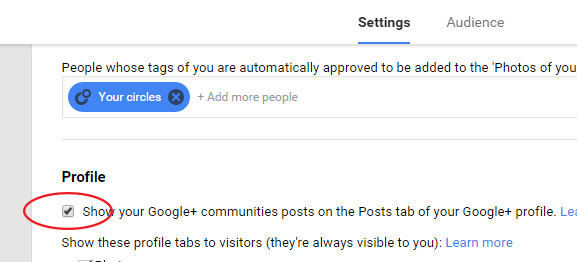
Stop multiple posts for shared YouTube videos and links appearing on Google Plus posts page

If you share lots of stuff via YouTube or Google Plus you may have noticed that your posts page on your google plus profile shows everything you share, everytime you share it.
This is fine if you only share something once but, if you share the same thing multiple times (on multiple sites/pages for example), then it will appear multiple times in your Google+ posts page, making it look a bit spammy.

Here’s how you can quickly and easily prevent this from happening….

  1. Go to your Google plus page
  2. Click “Home” in the top left
  3. Click “Settings”
  4. Scroll to the “Profile” section near the (bottom)
  5. Untick “Show your Google+ communities posts on the Posts tab of your Google+ profile”


Simple huh?

Hope this helped you. If it did please share on twitter, google plus, facebook etc or give me a little something towards my next caffeine fix by clicking the [Buy me a coffee] PayPal button in the sidebar!)

Facebook enable dislike button wall post scam

Another facebook scam:

Users will see a wall post, supposedly from a friend.

The wall post says:

Facebook now has a dislike button! Click ‘Enable Dislike Button’ to turn on the new feature!”

facebook enable dislike button wall post

This is quite clever and looks exactly like it might be a genuine add-on, the “Enable Dislike Button” link appears exactly where the “Share” button appears on regular posts.

If you click on the link, the same wall post will be posted to all your friends’ walls, meaning that more and more people will be tricked the same way.

This is a scam. No “Dislike” button will be added anywhere.

Many Facebook users have been suggesting for quite a while now that facebook have a “Dislike” button so this scam is probably going to fool quite a few people people.

Please let everyone know about this “enable dislike button” scam and ensure your friends understand that they should be cautious of posts like this put on their walls, even from if they come from their own friends!

If you, or anyone you know, has this message posted on their wall, you can either hide it or mark it as spam. If you mark it as spam it helps Facebook to hopefully become aware of and remove this rogue application.

Updated: Facebook chat emoticons, emotes and smilies / icons

Related articles:
– Change Facebook news feed to give it the old facebook look
– Facebook chat emoticons, emotes and smilies / icons

Want to add smilies to your Facebook chat conversations?

Here are the obvious (and maybe less obvious) smilies / emoticons / emotes that you can send to your friends in Facebook chat!

Simply type what’s next to the smiley and it’ll show up when u send it to your friends in Facebook chat!

smile = :-) or :) or :] or =)

frown = :-( or :( or :[ or =(

tongue = :-P or :P or :-p or :p or =P

grin = :-D or :D or =D

gasp = :-O or :O or :-o or :o

wink = ;-) or ;)

glasses = 8-) or 8) or B-) or B)

sunglasses = 8-| or 8| or B-| or B|

grumpy = >:( or >:-(

unsure = :/ or :-/ or :\ or :-\

cry = :'(

devil = 3:) or 3:-)

angel = O:) or O:-)

kiss = :-* or :*

heart = <3

kiki = ^_^

squint = -_-

confused = o.O or O.o

upset = >:O or >:-O or >:o or >:-o

pacman = :v

Facebook Curly Lips Smily / Emote curly lips = :3

facebook robot emoticon robot = :|]

facebook Chris Putnam emoticon Chris Putnam = :putnam:

facebook shark emoticon Shark = (^^^)

penguin facebook emoticon Penguin = <(“)

NEW!

42 emote = :42:

You can also change the text style:

Bold Text Bold Text = *Bold Text*

Underlined Text Underlined Text = _Underlined Text_

Bold & Underlined Text Bold Text = *_Bold and Underlined Text_*

This is a list of all currently known Facebook chat emoticons.
I’m sure Facebook will be adding more emoticons in the future and when they do i’ll update this post.

Facebook too slow? try Facebook Lite, the low-fat facebook

This lite version is now now longer available, Facebook decided to remove it.

That’s right, Facebook Lite, a stripped-down version of Facebook that shrinks Facebook down into its core features, making for a much smoother facebook experience.

This new version of the site is much more simple and cleaner in appearance and appears to be a better site for Facebook newbies or for anyone who finds the current site “too much” or noisy. It also does away with the old-school Facebook apps, which is just as well for the newest Facebook-connected services. (although farmtown/farmville addicts will still have to use full-fat facebook to harvest and plow!)

The major visual change in Facebook Lite, compared to the full-fat Facebook “Classic,” is simply that most of the the navigation and info page that was on the left of the page is now gone. The user is not distracted by the mostly superfluous details that resided there. The input box is also gone, replaced by buttons (Write, Post Photos, Post Video) that pop down the actual input forms only when needed.

The facebook chat feature is in there too, it’s not embedded in the facebook page but as a separate “pop-up” window instead.

Anyway enough from me, check it out for yourself… lite.facebook.com

…enjoy!

Facebook UnNamed App is not a spybot!

People are following the usual activity of updating their facebook status to inform others of scams etc but again by trying to warn others they are in fact doing exactly what the “scammers” want.

Here’s the latest, an “UnNamed App Internal SpyBot Hoax”…

ALERT >>>>> Has your facebook been running slow lately? Go to “Settings” and select “application settings”, change the dropdown box to “added to profile”. If you see one in there called “un named app” delete it… Its an internal spybot. Pass it on. about a minute ago….i checked and it was on mine.

it is NOT a virus or spyware, it is your “Boxes” tab, and Facebook is going to be getting rid of it soon, you can remove it yourself from your edit applications list if you want… not sure if Facebook will be replacing it with something else yet.

“Due to a small bug, an application listed as ‘Unnamed App’ appeared in some users’ Applications Settings,” spokeswoman Malorie Lucich said in an e-mail to CNN. “No user accounts or data were lost or damaged.”

Source: http://edition.cnn.com/2010/TECH/01/27/facebook.bug/

Please also be aware that when searching for this on Google I ended up at a page which wil tell you that your pc needs a scan (this is malware/spyware). So please be careful, it seems that whoever started this facebook “status” is just trying to get people googling and direct you to this harmful page.

Change New Facebook News Feed to give it the old facebook look

Share this with your friends on Facebook

If, like me, you don’t like the new style Facebook Home / News feed why not change it to display only status updates, like the old facebook!
(this also get’s rid of those annoying “Bored Friend took the blahblahblah quiz” posts etc)

here is how to get the old facebook look:…

When logged into facebook Click “Home”

Look to the top left menu and click on More…

facebook-news-feed-1

Then drag “Status Updates” to the top…

facebook-news-feed-2

After dragging to top, click on it. It’s now your default facebook newsfeed, just like the old facebook.

Simples!

Share this with your friends on Facebook