Updated: Facebook chat emoticons, emotes and smilies / icons

Related articles:
– Change Facebook news feed to give it the old facebook look
– Facebook chat emoticons, emotes and smilies / icons

Want to add smilies to your Facebook chat conversations?

Here are the obvious (and maybe less obvious) smilies / emoticons / emotes that you can send to your friends in Facebook chat!

Simply type what’s next to the smiley and it’ll show up when u send it to your friends in Facebook chat!

smile = :-) or :) or :] or =)

frown = :-( or :( or :[ or =(

tongue = :-P or :P or :-p or :p or =P

grin = :-D or :D or =D

gasp = :-O or :O or :-o or :o

wink = ;-) or ;)

glasses = 8-) or 8) or B-) or B)

sunglasses = 8-| or 8| or B-| or B|

grumpy = >:( or >:-(

unsure = :/ or :-/ or :\ or :-\

cry = :'(

devil = 3:) or 3:-)

angel = O:) or O:-)

kiss = :-* or :*

heart = <3

kiki = ^_^

squint = -_-

confused = o.O or O.o

upset = >:O or >:-O or >:o or >:-o

pacman = :v

Facebook Curly Lips Smily / Emote curly lips = :3

facebook robot emoticon robot = :|]

facebook Chris Putnam emoticon Chris Putnam = :putnam:

facebook shark emoticon Shark = (^^^)

penguin facebook emoticon Penguin = <(“)

NEW!

42 emote = :42:

You can also change the text style:

Bold Text Bold Text = *Bold Text*

Underlined Text Underlined Text = _Underlined Text_

Bold & Underlined Text Bold Text = *_Bold and Underlined Text_*

This is a list of all currently known Facebook chat emoticons.
I’m sure Facebook will be adding more emoticons in the future and when they do i’ll update this post.
Shutdown windows 7 without installing updates

There have been loads of times when updates are ready but i want the computer / laptop off and ready to move asap (to go home from work and take my laptop with me). was so annoying having to wait for windows to update when i didn’t want to.

I have found a way to shutdown windows 7 without being forced to install the updates…

Run regedit (search in start menu)

Under HKEY_LOCAL_MACHINE\Software\Policies\Microsoft\Windows\WindowsUpdate\AU
if the keys “WindowsUpdate” and “AU” aren’t there just add them (right click > New > Key)
right click > New > DWORD
name it “NoAUAsDefaultShutdownOption” double click it and enter value 1.

the “shutdown” button will never be changed by Windows Update from your default action to “shutdown and install updates”.
If updates are ready to be installed “shutdown and install updates” is instead displayed in the [>] menu to the side of the shutdown button

On my system it happend almost as soon as the registry value was added, but you may need to reboot before the change is applied.

Also important is “NoAutoRebootWithLoggedOnUsers”, also a DWORD in the same location with value 1. This stops Windows from rebooting automatically if a user is logged in or you leave it working overnight for example.

Compare CSS Stylesheet Tool

CSS is a standard used to define Web site presentation styles.
When a Web designer creates a CSS stylesheet for a site, he will evolve it through multiple versions with incremental changes.

This tool provides a solution that allows a web designer to clearly see the differences between two different css stylesheet files (classes only, not values)

Compare CSS Stylesheets

Description
A webpage that takes two CSS files and compares the classes contained in both. Resulting differences are highlighted in red.

Usage:
Click the “Compare CSS Tool” link below and simply upload the css files you want to compare and click the compare button.

Compare CSS Tool

Don’t want to sign into messenger when using hotmail?

I discovered that when using hotmail on my new Windows 7 laptop it automatically signs me into msn / live messenger. After trying to find a setting somewhere to disable this feature i have finally found it (and it’s really very easy)…

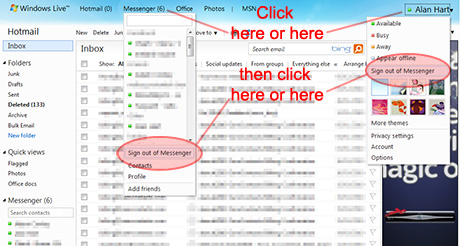
I discovered that all you need to do to stop messenger logging in every time you check your email, just log into hotmail as usual, click your name in the top right, or open the messenger list and click “Sign out of messenger”.

How to stop MSN / Live Messenger loading in Hotmail

This will permanently sign you out of messenger in hotmail, and only hotmail.
If you are logged in on the normal desktop app you will stay logged in.

If you sign out / close your browser and sign back in to hotmail, messenger won’t load leaving you free to check your emails in peace!

Change Juitter Time and Date Format

As you can see in the sidebar on the left i am using Juitter to retrieve my twitter feed, I didn’t like the default juitter date format because it’s rather long (“ddd,dd mm yyyy hh:mm:ss +0000”)

Here’s how you can reformat the default juitter time and date format…

Just insert the code below into the “jquery.juitter.js” file, underneath the line “var tweet = $.Juitter.filter(item.text);”

// Re-format Date/Time
//get Tweet date
var d=new Date(item.created_at); //Default date/time is when the tweet was published
var tweetdate=d.toLocaleDateString(); //rewrite date in a nicer way
//get Tweet time
var t=new Date(item.created_at);
var tweettime=t.toLocaleTimeString().substr(0,5); //rewrite and remove seconds
//pull it together
var timestamp=""+tweetdate+" at "+tweettime+"";
// Reformat Date/Time

Then in the few lines below this newly inserted code (the code that generates the HTML) replace “item.created_at” with “timestamp”

Simple!

main date conversion taken from: http://www.ibrii.com/n/f317z

Some useful web design links

Here are some geeky/webdesign thinga-ma-bobs i’ve stumbled across/used recently:

Regular Expressions Cheat Sheet

a very handy quick reference guide for regular expressions, including symbols, ranges, grouping, assertions and some sample patterns for beginners.
http://www.addedbytes.com/cheat-sheets/regular-expressions-cheat-sheet/


CSS Transparency

used on this site so you can see the background image behind content on smaller screen resoltions
Transparency is one of those weird things that is treated completely differently in all browsers.
don’t forget to read the comments at the bottom of this article too:
http://css-tricks.com/css-transparency-settings-for-all-broswers/


Twitter “Retweet” Button

The Retweet button is for website and blog publishers that want to encourage their audience to retweet their content on twitter.
Here’s a really smart bit of code using one simple piece of JavaScript to give up to date tweet counts and shorten your title and link for the retweets. Best of all it will work on any web page, anywhere!
http://help.tweetmeme.com/2009/04/06/tweetmeme-button/


Dezignus.com

Vector art, icons, brushes, textures, wallpapers, anime, girls, tutorials… nuff said!
http://dezignus.com/

if you found any of these useful, please tweet/share.

iamnotaspambot on Twitter

Created a new twitter user and unique hashtag @iamnotaspambot and #iamnotaspambot.

Hoping people may adopt it and maybe even get a trend going. Will have to wait and see how it does.

If you’re on Twitter why not give @iamnotaspambot some love using the hashtag #iamnotaspambot and he will try and give you a little bit of twitter love in return.

Comments on this post are moderated so may not appear instantly.

Modelio Photo Retouching

Have recently updated the Modelio website. Have changed the design slightly, and now have user registration and photo uploads for registered users.

Modelio photo editing offer the following and much more:

Cleaning backgrounds (e.g. removing objects / people)
complete background removal.
Fixing digital camera photos that have weird colouration
Level Adjustment
Enhancing slightly blurry/fuzzy images
red eye removal
teeth whitening
stray hair removal
spot/blemish removal etc etc.

Check it out here: www.modelio.co.uk

Become a fan of Modelio on Facebook
Also follow @Modelio on Twitter and add Modelio on MySpace.

Facebook too slow? try Facebook Lite, the low-fat facebook

This lite version is now now longer available, Facebook decided to remove it.

That’s right, Facebook Lite, a stripped-down version of Facebook that shrinks Facebook down into its core features, making for a much smoother facebook experience.

This new version of the site is much more simple and cleaner in appearance and appears to be a better site for Facebook newbies or for anyone who finds the current site “too much” or noisy. It also does away with the old-school Facebook apps, which is just as well for the newest Facebook-connected services. (although farmtown/farmville addicts will still have to use full-fat facebook to harvest and plow!)

The major visual change in Facebook Lite, compared to the full-fat Facebook “Classic,” is simply that most of the the navigation and info page that was on the left of the page is now gone. The user is not distracted by the mostly superfluous details that resided there. The input box is also gone, replaced by buttons (Write, Post Photos, Post Video) that pop down the actual input forms only when needed.

The facebook chat feature is in there too, it’s not embedded in the facebook page but as a separate “pop-up” window instead.

Anyway enough from me, check it out for yourself… lite.facebook.com

…enjoy!

Facebook UnNamed App is not a spybot!

People are following the usual activity of updating their facebook status to inform others of scams etc but again by trying to warn others they are in fact doing exactly what the “scammers” want.

Here’s the latest, an “UnNamed App Internal SpyBot Hoax”…

ALERT >>>>> Has your facebook been running slow lately? Go to “Settings” and select “application settings”, change the dropdown box to “added to profile”. If you see one in there called “un named app” delete it… Its an internal spybot. Pass it on. about a minute ago….i checked and it was on mine.

it is NOT a virus or spyware, it is your “Boxes” tab, and Facebook is going to be getting rid of it soon, you can remove it yourself from your edit applications list if you want… not sure if Facebook will be replacing it with something else yet.

“Due to a small bug, an application listed as ‘Unnamed App’ appeared in some users’ Applications Settings,” spokeswoman Malorie Lucich said in an e-mail to CNN. “No user accounts or data were lost or damaged.”

Source: http://edition.cnn.com/2010/TECH/01/27/facebook.bug/

Please also be aware that when searching for this on Google I ended up at a page which wil tell you that your pc needs a scan (this is malware/spyware). So please be careful, it seems that whoever started this facebook “status” is just trying to get people googling and direct you to this harmful page.